
T-Mobile 5G Home Internet: Use Own Router Guide & Double NAT Fix
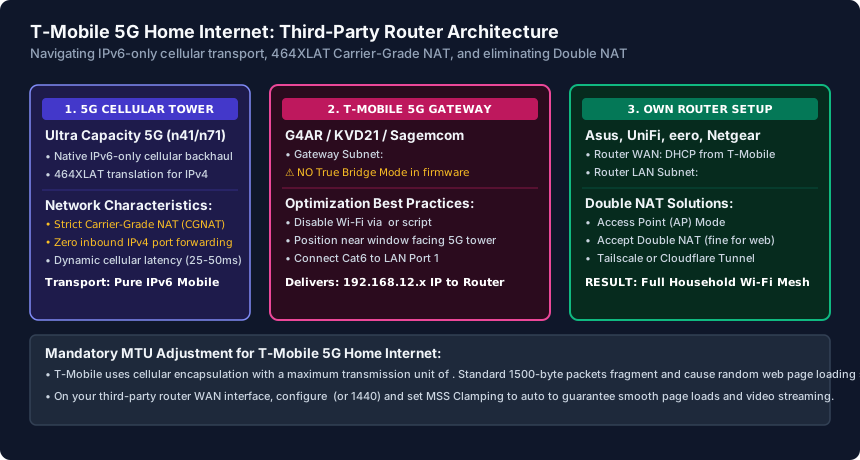
To use your own router with T-Mobile 5G Home Internet (G4AR, KVD21, or Sagemcom gateways), connect your router's WAN port to LAN Port 1 of the gateway via Cat6. Because T-Mobile does not support Bridge Mode, disable the gateway's Wi-Fi radios using the HINT Control app, set your router's WAN MTU to 1420, and use Tailscale or Cloudflare Tunnel to bypass Carrier-Grade NAT (CGNAT).
- No Bridge Mode in Firmware: T-Mobile's Arcadyan G4AR, Sagemcom Fast 5688W, and Nokia 5G gateways lack a native bridge mode or DMZ toggle in their official firmware.
- Cellular MTU Requirement: Cellular 5G transport mandates lowering your third-party router's WAN MTU to
1420(or1440) to prevent packet fragmentation and video buffering. - Wi-Fi Radio Disabling: T-Mobile removed the Wi-Fi toggle from their mobile app; use the open-source HINT Control utility or Python scripts to disable 2.4/5 GHz radios and reduce thermal throttling.
- Bypassing Strict CGNAT: T-Mobile uses IPv6-only transport with 464XLAT CGNAT for IPv4; inbound port forwarding is impossible without a VPN mesh (Tailscale) or reverse proxy tunnel.
T-Mobile 5G Gateway Architecture: Why There Is No Bridge Mode
With over 6 million subscribers, T-Mobile 5G Home Internet (TMHI) is one of the most widely deployed wireless broadband services in the United States. However, power users, homelabbers, and gamers connecting third-party mesh Wi-Fi systems (such as eero, ASUS ZenWiFi, or UniFi gateways) quickly encounter unique architectural limitations.
Unlike fiber or cable modems, all T-Mobile 5G gateways—including the Arcadyan G4AR / G4SE (white box with external antenna ports), Arcadyan KVD21 (black square tower), and Sagemcom Fast 5688W—are engineered as locked-down mobile hotspots. Their firmware contains zero native bridge mode, IP passthrough, or DMZ functionality.
Furthermore, T-Mobile's cellular core operates on a pure IPv6-only mobile architecture. To deliver IPv4 connectivity to consumer devices, the gateway uses 464XLAT (RFC 6877) carrier-grade translation. This means your gateway does not receive a public routable IPv4 address; it sits behind a strict Carrier-Grade NAT (CGNAT) firewall that blocks all unsolicited inbound IPv4 traffic, resulting in a permanent Moderate (Type 2) or Strict (Type 3) NAT status on consoles.
How to Connect Your Third-Party Router: Two Proven Approaches
Because you cannot convert the T-Mobile gateway into a pure bridge modem, you must choose between two network topologies:
Approach A: Router Mode with Double NAT (Recommended for Advanced Features)
In this configuration, your router manages its own local subnet, DHCP server, parental controls, 802.1Q VLANs, and firewall rules:
- The T-Mobile gateway operates on the
192.168.12.0/24subnet (gateway IP192.168.12.1). - Connect a Cat6 cable from LAN Port 1 on the T-Mobile gateway to the WAN port of your own router.
- Ensure your own router uses a completely different internal subnet (such as
192.168.1.1,192.168.50.1, or10.0.0.1). Most modern routers detect the WAN conflict and adjust automatically. - Your router receives an IP like
192.168.12.150from T-Mobile. While this creates a "Double NAT" environment, Double NAT has zero negative impact on 98% of internet tasks—including 4K Netflix/YouTube streaming, Zoom video conferencing, web browsing, and remote work VPNs (Cisco AnyConnect, GlobalProtect, OpenVPN).
Approach B: Access Point (AP) Mode (Best for Simple Mesh Wi-Fi)
If you purchased an eero, Netgear Orbi, or TP-Link Deco mesh system solely to expand Wi-Fi coverage across a large home and do not need advanced firewall controls, switch your mesh system into Access Point (Bridge/AP) Mode. In AP mode, your mesh system disables its internal routing and DHCP server, allowing the T-Mobile gateway to assign all IP addresses directly. This completely eliminates Double NAT.
Disabling T-Mobile Gateway Wi-Fi via HINT Control
Leaving the T-Mobile gateway's built-in Wi-Fi radios broadcasting alongside your third-party router creates severe 2.4 GHz and 5 GHz co-channel RF interference and causes the gateway to run unnecessarily hot. Because T-Mobile removed the Wi-Fi disable toggle from the official T-Life mobile app, use the community-standard HINT Control application (available free for Windows, macOS, Android, and iOS):
- Connect your computer or phone to the T-Mobile gateway's Wi-Fi network.
- Launch HINT Control. It automatically connects to the gateway's internal REST API endpoint at
http://192.168.12.1. - Enter the Admin Password printed on the sticker located on the bottom or back of your gateway.
- Navigate to the Wi-Fi Settings tab. You will see individual toggles for the 2.4 GHz, 5 GHz Low, and 5 GHz High radios across all SSID profiles.
- Toggle every radio to Off / Disabled and click Apply.
The gateway's internal Wi-Fi antennas will power off immediately, reducing internal thermal load by up to 8°C and leaving the wireless spectrum 100% clean for your third-party router.
The Critical MTU 1420 Fix & Bypassing CGNAT for Hosting
To ensure maximum throughput and stability on T-Mobile 5G Home Internet, apply these two advanced engineering configurations:
1. Adjust WAN MTU to 1420 to Stop Page Freezing
Because T-Mobile encapsulates cellular packets inside mobile tunnel protocols (GTP-U/IPv6), standard 1500-byte Ethernet frames exceed the cellular path MTU. This causes packet fragmentation, manifesting as random web pages that hang indefinitely, broken banking portals, and stuttering video streams. Log into your third-party router's WAN configuration and manually set MTU to 1420 (or 1440). Enable MSS Clamping if available. Web pages will load instantly without stalls.
2. Bypassing T-Mobile CGNAT for Plex, Home Assistant, and Gaming
Because T-Mobile blocks incoming IPv4 port forwards at the cellular carrier level, opening ports (like port 32400 for Plex or port 25565 for Minecraft) inside your router will never work. To host services accessible outside your home:
- Cloudflare Tunnels: Run
cloudflaredon a Raspberry Pi or homelab server to expose web services and Home Assistant over HTTPS securely without opening any router ports. - Tailscale / WireGuard Mesh: Install Tailscale on your server and remote devices. Tailscale establishes outbound NAT-traversal connections (via DERP relays) that bypass T-Mobile CGNAT entirely with zero configuration.
- IPv6 Direct Hosting: If your third-party router supports IPv6 passthrough, devices receive real globally routable IPv6 addresses. External clients connecting over IPv6 can reach your services directly.
T-Mobile 5G Gateway Hardware Specifications & Router Compatibility
| Gateway Model | Hardware Manufacturer | Ethernet Ports | Third-Party Router Workaround |
|---|---|---|---|
| Arcadyan G4AR | Arcadyan / T-Mobile | 2x 2.5GbE RJ45 + 4x SMA antenna ports | Disable Wi-Fi via HINT Control; WAN MTU 1420 |
| Arcadyan G4SE | Arcadyan / T-Mobile | 2x 2.5GbE RJ45 + 4x SMA antenna ports | Disable Wi-Fi via HINT Control; WAN MTU 1420 |
| Arcadyan KVD21 | Arcadyan / T-Mobile | 2x 1000BASE-T RJ45 ports | Disable Wi-Fi via HINT Control; WAN MTU 1420 |
| Sagemcom Fast 5688W | Sagemcom | 2x 1000BASE-T RJ45 ports | Disable Wi-Fi via web API script; WAN MTU 1420 |
| Nokia 5G21 (Trashcan) | Nokia | 2x 1000BASE-T RJ45 ports | Native web GUI at 192.168.12.1 supports Wi-Fi toggle |
T-Mobile 5G Home Internet Router Setup Checklist
- Position the T-Mobile gateway on an upper floor near a window facing your local cell tower.
- Connect Cat6 Ethernet from Gateway LAN Port 1 to the WAN port of your third-party router.
- Ensure your router's LAN IP is configured to a non-conflicting subnet (e.g., 192.168.1.1/24).
- Download HINT Control and disable all 2.4 GHz and 5 GHz wireless broadcast radios on the gateway.
- Set your third-party router WAN MTU to 1420 or 1440 to prevent cellular packet fragmentation.
- Deploy Tailscale or Cloudflare Tunnels if you need remote access to Plex, cameras, or homelab servers.
Frequently Asked Questions
Will Double NAT hurt my gaming ping on T-Mobile 5G Home Internet?
No. Double NAT adds less than 0.5 milliseconds of local routing latency, which is imperceptible compared to the 30ms–50ms baseline latency of cellular wireless connections. Your strict NAT status on consoles is caused by T-Mobile's upstream carrier-grade NAT (CGNAT), not your local router.
Can I get an Open NAT type on Xbox or PlayStation with T-Mobile 5G?
On pure IPv4 games, achieving an Open NAT (Type 1) is impossible on T-Mobile because cellular carriers share one public IPv4 address across thousands of subscribers. However, on modern games that fully support IPv6 (like Halo, Call of Duty, and Fortnite), enabling native IPv6 on your router provides direct end-to-end routing with open multiplayer sessions.
Why does HINT Control show an error when connecting to my gateway?
Make sure your device is connected directly to the gateway via Ethernet or gateway Wi-Fi when running HINT Control for the first time. Verify that you are entering the unique Admin Password printed on the gateway sticker, not your Wi-Fi password.
Can I replace the T-Mobile gateway entirely with a third-party 5G cellular modem?
Technically, third-party modems (like Chester Cheetah or Suncomm 5G routers) work if you move your T-Mobile SIM card and configure the APN to 'fast.t-mobile.com'. However, T-Mobile's terms of service mandate using official gateway hardware, and carrier IMEI sweeps can temporarily suspend non-approved devices.
Related Router Setup & Engineering Guides
- DNS Settings on a Router — Configure router DNS settings using Cloudflare 1.1.1.1, Quad9 9.9.9.9, or Google 8.8.8.8. Understand WAN vs DHCP LAN DNS, DoH/DoT encryption, and DNS leaks.
- IPv6 Router Settings Explained — Configure IPv6 router settings for Comcast Xfinity, AT&T Fiber, and Verizon Fios. Set up Native DHCPv6-PD, SLAAC, /56 or /60 prefix delegation, and firewalls.
- Parental Control Setup on a Router — Configure router parental controls that kids cannot bypass: set up Family DNS (1.1.1.3), defeat MAC address randomization, and create a Kid-Safe WiFi SSID.
- Port Forwarding Guide for Home Routers — Set up port forwarding safely on any router: create static DHCP reservations, map TCP/UDP ports, troubleshoot CGNAT/Double NAT, and avoid exposing RDP or NVR.